Production and performance
Automated counting
A camera over the belt counts every piece and records when product stops flowing.
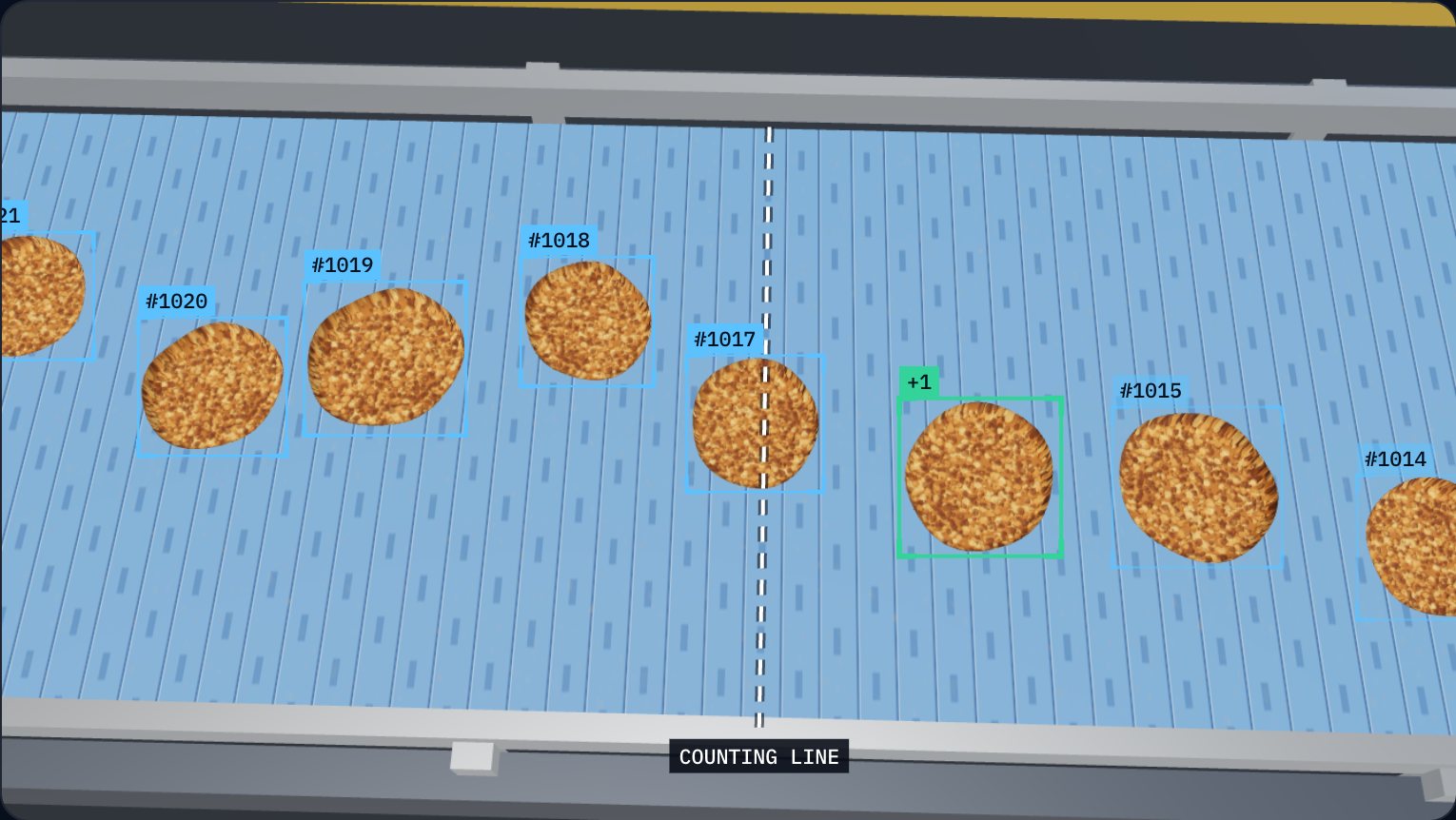
- 01 Detects each piece
- 02 Tracks it with an ID
- 03 Counts on crossing
The problem
Counting by hand is slow, costly and rarely adds up
When a case holds too many or too few, the error is found late: at the scale, at the customer or in a complaint. Fixing it can mean reopening cases, recounting and repacking by hand.
In validation on the plant floor
Sound familiar?
- Cases or bags with too many or too few units.
- People assigned to counting instead of producing.
- Differences between production counts and inventory counts.
- Product given away because nobody knows how much actually went in.
What we ask first
Before proposing anything, we understand what happens on your line today.
- What happens when a case holds too many or too few? Where is it found?
- Does fixing the error mean reopening, recounting or repacking?
- Who finds out about the error and who fixes it?
- Where are damaged pieces detected and where do they go?
How we approach it
We install a camera where the count matters. A computer vision model detects and tracks each piece, counts it as it crosses a virtual line, and sends counts and events to the software, not the video.
1. We record and study your product
We record real footage of the belt: speed, spacing between pieces, lighting and overlapping product.
2. We train and evaluate the model
The model's count is compared against manual counts on clips the model has not seen.
3. We process on site
An edge computer next to the line analyses the video; only counts and events go up.
4. We connect the count to the order
Each count is linked to the line, product and order being run.
What it takes
Software
- Detection and tracking model trained on your product
- Count and event log by line
- Count view in the production dashboard
Plant equipment
- Industrial camera with a lens suited to the distance and belt width
- Controlled lighting when plant light varies
- Edge computer (Jetson-class) next to the line
- Enclosure, mount, PoE switch and backup power (UPS)
Camera, lens and lighting are chosen for the product, the belt and the environment (cold, humidity, washdown); the final configuration is defined during technical design.
Who uses the information
- Packaging operator
- Sees the count for the current case or batch.
- Line supervisor
- Spots when pace drops or product stops flowing.
- Inventory and shipping
- Receives a produced quantity that matches what was packed.
Decisions it supports
- 01Stop or adjust filling before completing off-count cases.
- 02Free up people who count by hand today for other work.
- 03Investigate a shift or product where the count doesn't add up.
How value is measured
We measure before and after, on your line. Value is shown with your data, not promises.
- Difference between manual and automatic count
- Counted in parallel during validation, over the same periods.
- Cases reopened or repacked due to count errors
- Recorded before and after installation.
- Hours spent counting by hand
- Compared per shift before and after.
What it connects to
The count is the foundation: when product stops flowing a stop is recorded, and if it passes your threshold the owner is alerted.
- Production controlActual output against target, by line and by hour, without waiting for the shift report.→
- Downtime and OEEEvery stop with its time, duration and cause, and an OEE you can explain.→
- Alerts and follow-upThe problem reaches the right person in the moment, and its follow-up is recorded.→
Let's start with one problem.
Tell us what's costing you most today. We review it with you, show how we'd solve it and estimate its value together.